

Construction & plant
Track plant, attachments and site vehicles across several jobs at once, and prove who was on site and for how long when the hours are disputed.
A mini-excavator sits on a site in Mosta for three weeks. Nobody is sure whether it is still needed there, the hire company is still billing for it, and on Monday morning it is gone.
Construction fleets are harder to track than delivery fleets because the assets don't come back to a depot at the end of the day. They move between sites on low-loaders, they get borrowed between crews, and the expensive ones aren't vehicles at all — they're attachments, generators and tool packs that live in the back of a van.
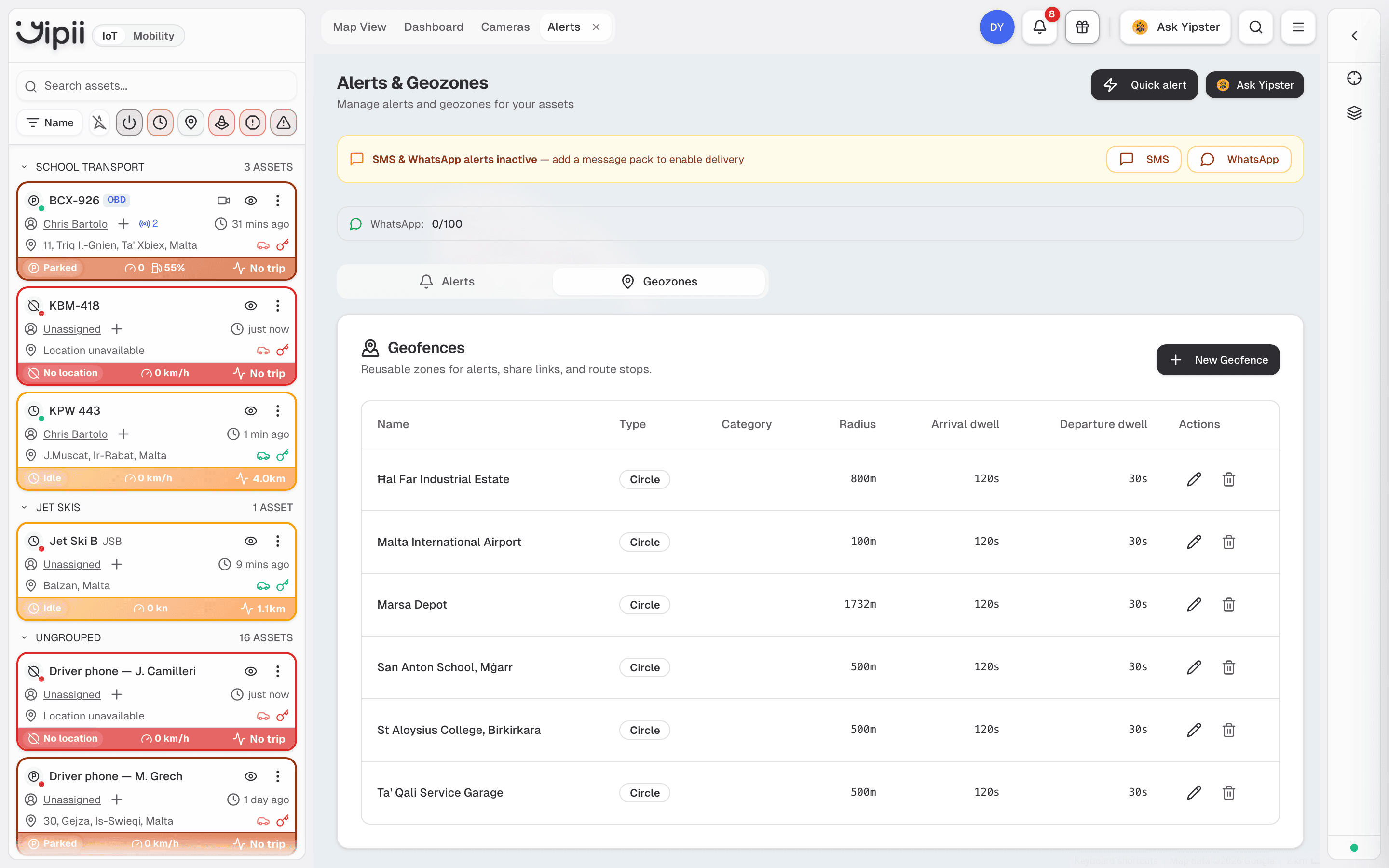
A geofence per site is what turns "the machine moved" into "the machine left the Ħal Far site at 23:14".
What goes wrong today
- Plant theft. Machines are left on unsecured sites overnight and at weekends. The first anyone knows is when a crew turns up to work and the machine is missing.
- Idle plant nobody reclaims. A machine finishes its task and stays where it is. On hire, that's a daily charge for an asset doing nothing; owned, it's a machine you hired a second one of because you didn't know you already had one free.
- Attachments and tools walk. Breakers, buckets and generators move between vans without a record. They're too small for a hardwired tracker and too valuable to keep replacing.
- Disputed time on site. A client queries an invoice for eight hours of plant time. You have a timesheet and they have a doubt, and nothing else.
How Yipii handles it
| Problem | What you use | What you get |
|---|---|---|
| Machines moving out of hours | Geofences around each site, plus an unauthorised-movement alert with quiet hours | A message the moment a machine crosses the site boundary outside working hours — not a discovery on Monday |
| Battery cut to disable a tracker | Power-cut and external-voltage alerts | The disconnection itself becomes the alert |
| Idle plant on hire | Stops & idling and point-visits reports | A weekly list of machines that haven't moved, by site |
| Attachments and tool packs | Portable beacons paired to whichever vehicle carries them | A timeline of which van each item travelled in, without a tracker per item |
| Disputed site hours | Geofence entry/exit history and the point-visits report | Timestamped arrival and departure per machine, per site, exportable to PDF or Excel |
| Which machine is where, right now | Live map with asset groups per site | One screen instead of four phone calls |
A day in the life
06:40 — Low-loader leaves the yard. It crosses the yard geofence and the site foreman's phone shows the machine is on its way.
07:15 — The excavator is offloaded at the Mosta site. Entering the site geofence starts the clock that will appear on the client's report.
12:00 — The site manager opens the live map, filtered to the Mosta asset group, and sees three of four machines running. The fourth hasn't moved since 09:00 — it gets reassigned to the Naxxar job rather than hiring another.
19:30 — Everything is parked and the site is quiet. An unauthorised-movement alert is armed for all site assets outside working hours.
23:14 — The excavator's ignition comes on. Because it is outside the working-hours window, Yipii sends an SMS and a WhatsApp message immediately, with the live position and a share link the responding manager can open without logging in.
Friday — A scheduled report lands by email: hours on site per machine, per job, for the week. It goes out with the invoice.
What you'll need
Being straight about this saves everyone a difficult conversation later.
- Hardwired trackers on plant. Machines without a permanent 12/24 V supply need a wired install by an auto-electrician. Yipii supports Teltonika and Cellocator hardware; Cellocator is commonly used on heavy machinery, with a narrower remote-command set than Teltonika.
- Beacons for attachments. Bluetooth beacons are detected by a nearby tracker, so an attachment is only visible while it's near a tracked vehicle. That's enough to answer "which van took the breaker" — it is not live tracking of a loose item on open ground.
- A geofence per site. Budget ten minutes at the start of each job to draw the site boundary. This is the step that makes everything else work.
- No engine-hours servicing. Yipii schedules maintenance by distance or by date, not by engine run-time. For plant that wears by hours, approximate with a calendar interval.
Typical results
There is no industry-standard number for this and we would rather not invent one. What we can show is the arithmetic, so you can put your own figures in:
| Lever | Assumption | Annual effect |
|---|---|---|
| One avoided machine theft | Mini-excavator replacement value €18,000, excess and downtime excluded | €18,000 one-off |
| Off-hire idle plant one week earlier | €120/day hire × 5 days × 6 occurrences a year | €3,600 |
| Avoided duplicate hire | One machine reassigned instead of hired, 4 times a year, 3 days each | €1,440 |
These are worked examples using the assumptions shown, not measured customer outcomes. Plug in your own hire rates and the model holds.
Get started
- Register your trackers by QR scan or IMEI.
- Draw a geofence around each active site.
- Set up an unauthorised-movement alert with working-hours quiet periods, sent to the people who would actually respond at 23:14.
- Group assets by site so the map filters to one job at a time.
Servicing plant as well as tracking it? Yipii Mobility handles work orders, parts and inspection records for the same assets.
Was this page helpful?