

Put your brand on tracking links
Put your logo, colour and contact details on the tracking pages your customers open, and ask happy customers for a Google review.
When a customer opens a tracking link, the page can carry your logo, your colour and your phone number instead of Yipii's. There is no Branding page in the menu: it is the Branding & Default Contact part of Settings › Company.
Before you start — you need to be an account admin.
Steps
Go to Settings › Company. Click the logo square under Company details and choose your logo — PNG, JPG, SVG or WebP, up to 2 MB. It is saved straight away. For the name customers see, click Edit on Company details, fill in Brand Name and click Save.
Click Edit on Branding & Default Contact. It is a separate Edit from the one on Company details above it.
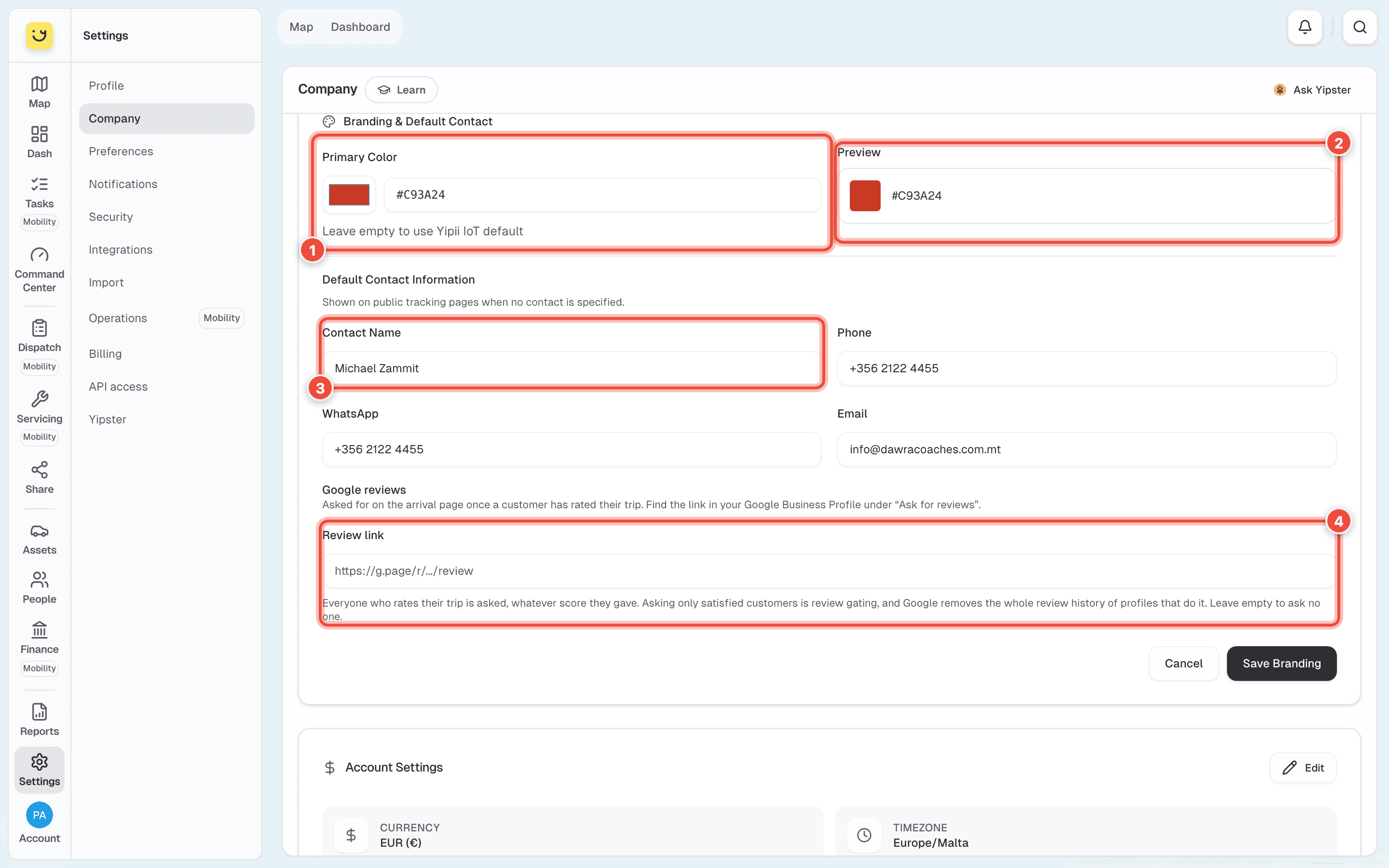
Set the Primary Color (1): pick it, or type it as a hex value — #C93A24. Preview (2)
shows the result. Leave it empty to keep Yipii's colour.
Fill in the Default Contact Information: Contact Name (3) — the name a customer sees,
such as Michael Zammit — then Phone, WhatsApp and Email, such as
+356 2122 4455 and info@dawracoaches.com.mt.
Optional: under Google reviews, paste your Review link (4). You find it in your Google Business Profile under Ask for reviews.
Click Save Branding.
What happens next
Tracking links show your colour and logo the next time the page is opened, so there is nothing to create again. The contact details are used on any link that has no contact of its own.
With a Review link set, the arrival page asks every customer who rated the trip to leave a Google review — whatever score they gave. Asking only the happy ones breaks Google's rules, and Google can remove a profile's whole review history for it.
Choosing a colour
The colour is used for accents — buttons and highlights — not as a background. Pick one dark enough to read as text on white. A pale yellow that looks right on a van is hard to read as a button on a phone in the sun.
If it doesn't work
| Symptom | Cause | Fix |
|---|---|---|
| There's no Branding page in Settings | Branding is part of Company | Go to Settings › Company › Branding & Default Contact |
| You can't find where to upload the logo | The logo belongs to Company details | Click the logo square under Company details |
| Upload a PNG, JPG, SVG, or WebP image or File too large | The logo is another kind of file, or over 2 MB | Use a square PNG with a transparent background, under 2 MB |
| The fields can't be changed | You are not an account admin | Ask an admin to make the change |
| A link shows another contact | That link has its own contact | Edit the link's contact under Share |
Related
- Share a tracking link — where the branding shows.
- Set up your company — the rest of the Company page.
Was this page helpful?