

Read and download a report
A finished report: the totals, searching and filtering the rows, choosing columns, scheduling it, and downloading it as PDF or Excel.
A finished report opens on the Reports page: its totals across the top, then one row per trip, stop or reading. This page uses a Trip report for Hotel Shuttle 1 on 20 October 2026: one vehicle, one day, one row per trip.
Before you start — you need a finished report. Run one, or open one from History.
How to read it
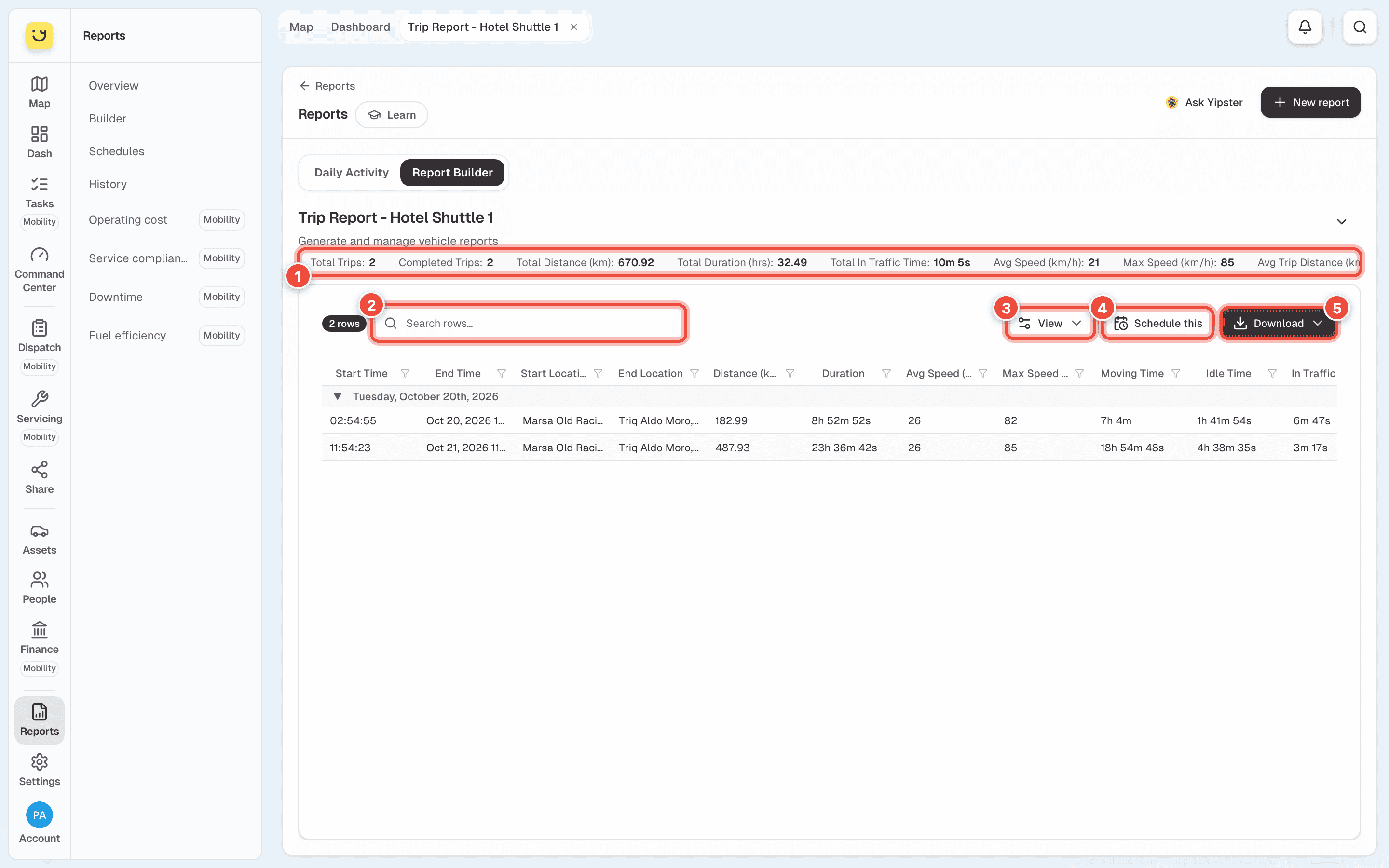
- The totals — the whole report in one line: for a Trip report, the number of trips, distance, driving time, average and top speed, and time stopped. Scroll the line sideways for the rest.
- Search rows — finds rows containing what you type, such as a street or a town. The count beside it says how many rows are showing. Each column heading also has a filter.
- View — choose which columns to show, and switch Visual indicators (speed colours, status pills, highlights) on or off.
- Schedule this — opens a new email schedule with this report's type and vehicle filled in. See Email a report on a schedule.
- Download — Download PDF or Download Excel. Yipii builds the file from the same dates and vehicle, and it downloads when it is ready.
Rows are grouped by day. Click the arrow beside a day to fold it away. Reports with places in them, such as Trail and Stops & Idling, also have Show map.
On a phone, the report has two tabs: Totals and Table (1). The table's View, Schedule and Download buttons are on the Table tab.
Share it
A report has its own address. Copy it from the browser and send it to someone on your account: it opens the same report, without running it again. They need to be able to see Reports and that vehicle.
If it doesn't work
| Symptom | Cause | Fix |
|---|---|---|
| This report isn't kept any more | Reports are kept for a limited time | Choose the same report and dates and click Generate Report |
| This report didn't finish | Building it failed | Click Generate Report to try again |
| A column you need is missing | It is switched off | Open View and tick it |
| The download takes a while | Yipii builds the file before it downloads | Wait for it. A long report can take a minute |
| The totals do not match the Command Center | The report covers different times — check the hours in the dates, not just the days | Run it again from 00:00 to 23:59 |
Related
- Find a report you ran before — every report, and its files.
- Email a report on a schedule — the same report every week.
Was this page helpful?