

Check your trackers and SIM cards
Assets › Devices & SIMs: which trackers are fitted, which have not moved for a week, which SIM cards the network says are inactive, and how to export the list.
Assets → Devices & SIMs lists every tracker and SIM card on your account, fitted to a vehicle or still in stock. Check it when a vehicle stops showing on the map, or before you query what you are billed for.
Before you start — you need to be an account admin or a fleet manager.
Steps
Go to Assets → Devices & SIMs. The tiles at the top count Trackers, Fitted, Not fitted, Not moved 7+ days (1) and SIMs inactive (2).
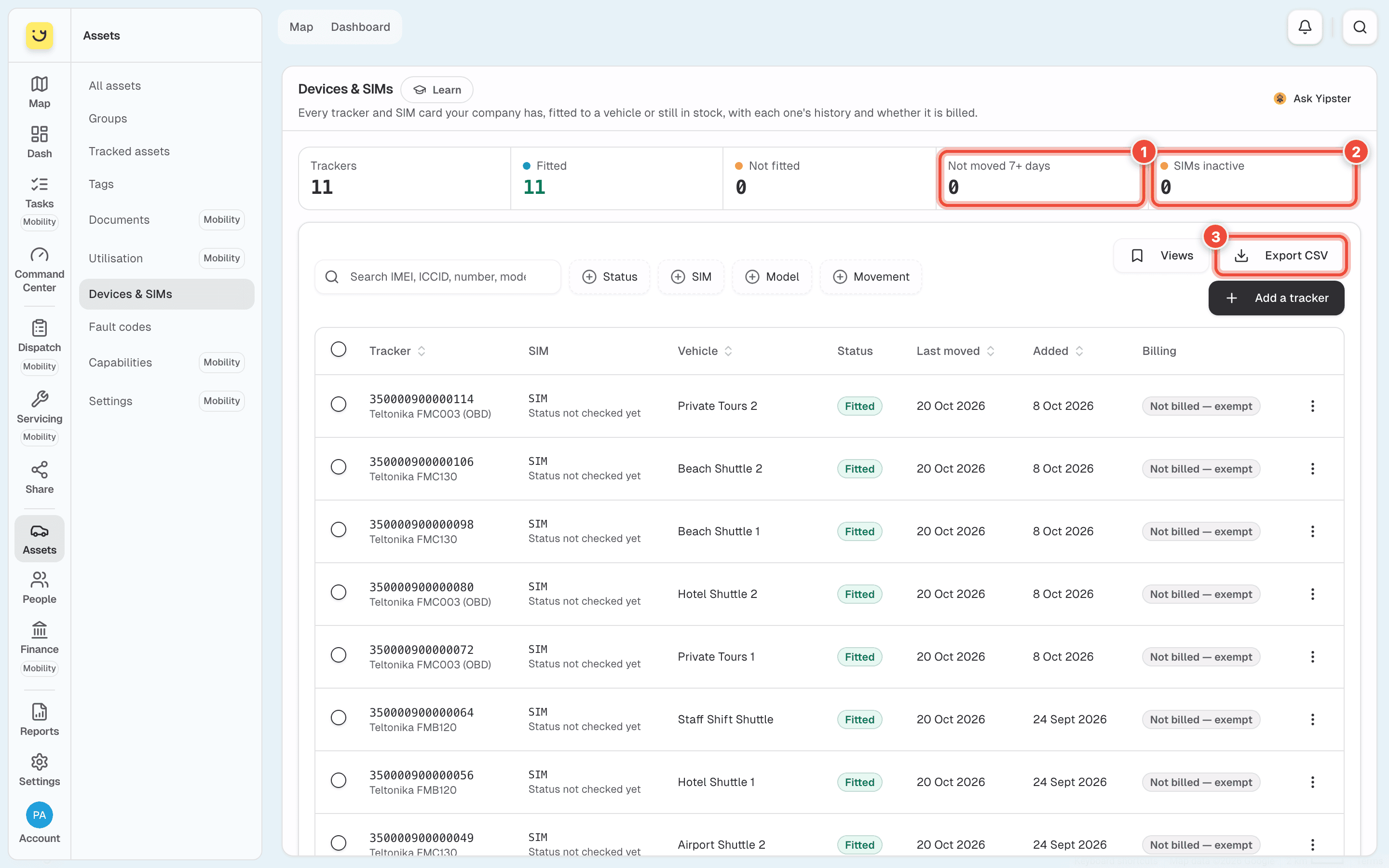
Click Not moved 7+ days (1) to list trackers whose vehicle has not moved or had its ignition on for a week. A parked vehicle is normal. Yipii knows when a tracker last moved, not when it last sent a message.
Click SIMs inactive (2) to list trackers whose SIM card the network reports as inactive. Each row's SIM line says what the last check found and when — Active as of 14 Oct 2026, Inactive as of …, or Status not checked yet.
Narrow it further with Status, SIM, Model or Movement, or search by IMEI, ICCID, phone number, model or vehicle. Click Trackers to clear a tile's filter.
Click Export CSV (3). The file holds every row your filters match, not only the page on screen, with the SIM's ICCID, number, network and status.
What happens next
Click a row to open it. Open — log and billing in its ⋯ menu shows the tracker's history and whether it is billed. A tracker that is not fitted offers Fit to a vehicle, and a fitted one offers Remove from its vehicle.
The SIM status comes from the network, which Yipii asks once a day. It is not a live reading.
If it doesn't work
| Symptom | Cause | Fix |
|---|---|---|
| A tracker is under Not moved 7+ days but nothing is wrong | The vehicle is parked. The tile counts movement, not messages | Nothing to fix if the vehicle is meant to be off the road |
| A SIM says Inactive but the vehicle reported today | The status is from the last daily check, and the network can lag | Look at the as of date. If it is days old, contact Yipii support |
| A row says Status not checked yet but is counted in SIMs inactive | The tile counts SIMs the network has not been asked about yet | Wait for the next daily check |
| First … rows only — narrow the filters appears beside the button | The export has a row limit | Filter the list, then export again |
| Devices & SIMs is not in the Assets menu | Your role is not admin or fleet manager | Ask an account admin |
Related
- Trackers — register a new tracker and read its health.
- Assets — the Silent 3+ months tile finds vehicles whose tracker has stopped sending.
Was this page helpful?