

Rename a vehicle, or change its group, type or fleet status
Change a vehicle's name, type, fleet status or group in its row on All assets. Each change saves at once, with Undo for a few seconds.
Change a vehicle's name, type, fleet status or group in its own row, without opening anything. Each change saves the moment you pick it.
Before you start — you need to be an account admin or a fleet manager. Every other role sees the same list as plain text.
Steps
Go to Assets → All assets and find the vehicle. Search for its name or its plate:
Hotel Shuttle 1 and HTL 501 find the same van.
Hover the row. A pencil appears beside the name (1), and a small arrow beside each value you can change.
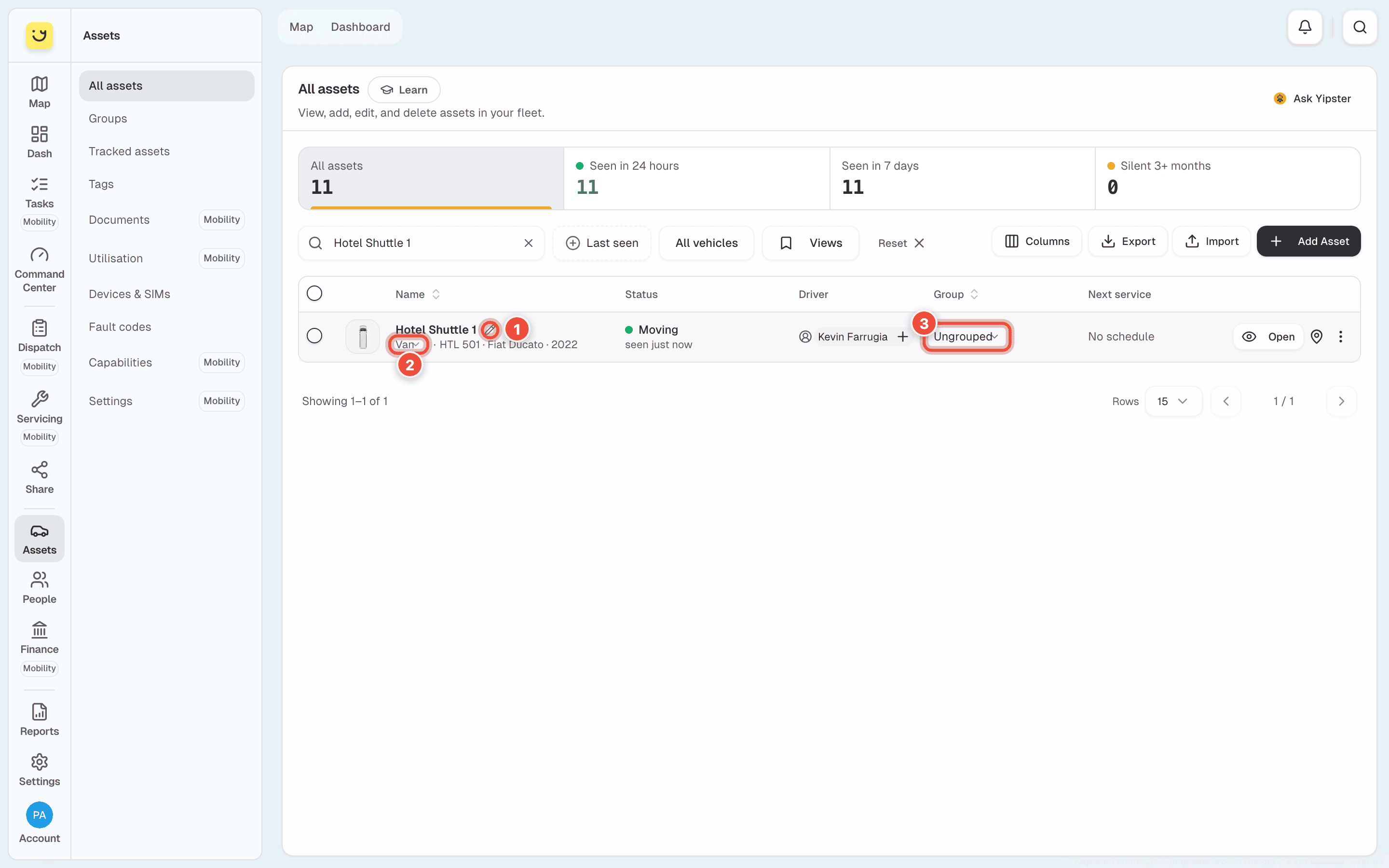
To rename it, click the pencil beside the name (1), type the new name and press Enter.
Esc cancels. The name is what shows on the map, so use what your drivers call it —
Hotel Shuttle 1.
To change the rest, click the value and pick from the list:
- Type (2), under the name —
Van,Bus,Jetski. - Group (3) — one of your groups, or Ungrouped.
- Fleet status, under the live status —
Active, for example. If none is set, it reads Set fleet status while you hover the row. It shows only on an account that has fleet statuses, which is why there is none in the picture.
Check for Saved beside the value. To take it back, click Undo next to it within about 6 seconds.
On a phone
The list is cards on a phone, and a card does not change anything in place. Tap ⋯ on the card, then Edit details. Change Name, Asset Type, Asset Group or Status, then tap Update Asset.
What happens next
The new name shows on the map, in the vehicle's Command Center and, on an account with Yipii Mobility, on the Dispatch board. The tiles and the list refresh.
There is no Undo after you set a type or a fleet status for the first time, because there was no earlier value to go back to. Pick again to change it.
If it doesn't work
| Symptom | Cause | Fix |
|---|---|---|
| No pencil or arrows appear when I hover a row | Your role cannot change vehicles. Only admins and fleet managers can | Ask an account admin to change your role in People → Team & seats |
| It said Not saved and the old value came back | Yipii refused the change and put the value back | Hover Not saved to read why, fix that, and pick again |
| Saved showed but there was no Undo | The field was empty before, so there is nothing to undo to | Pick the value you want instead |
| I can't change anything in the list on my phone | Cards on a phone do not edit in place | Tap ⋯ → Edit details |
| The plate, make or model can't be changed here | They are on the vehicle record, not in the row | Follow Change a vehicle's plate, make, model or year |
Related
- Assign a driver to a vehicle — the Driver column works the same way, with one exception mid-trip.
- Group your vehicles — make a group before you move vehicles into it.
- Assets — what else is on the list and in the Assets menu.
Was this page helpful?