

Reports
Two ways to get numbers out of Yipii — the Daily Activity glance and the Report Builder — why generation is asynchronous, and the two temperature sources.
Open Reports from the main menu and you get a tab with two views: Daily Activity for the "what happened today" question, and Report Builder for everything that needs choosing.
Both views work on a phone, but the builder is a desk job — picking a report type, a date range, vehicles and advanced options is a lot of form on a 6-inch screen, and in practice almost nobody does it on one. Check the day's activity on mobile; build reports at a desk.
Daily Activity
One vehicle, one day. Pick the vehicle from Select vehicle…, then Today, Yesterday or a Date — and you get its trips, distance and idle time without building anything.
It opens empty on Select a vehicle, so it is a glance at one asset rather than a fleet summary. For the whole fleet on one screen, use the dashboard.
Nine seconds, no sound. The clip starts on the Reports tab; getting there is the main menu, since Reports is the one view with no linkable URL.
Report Builder
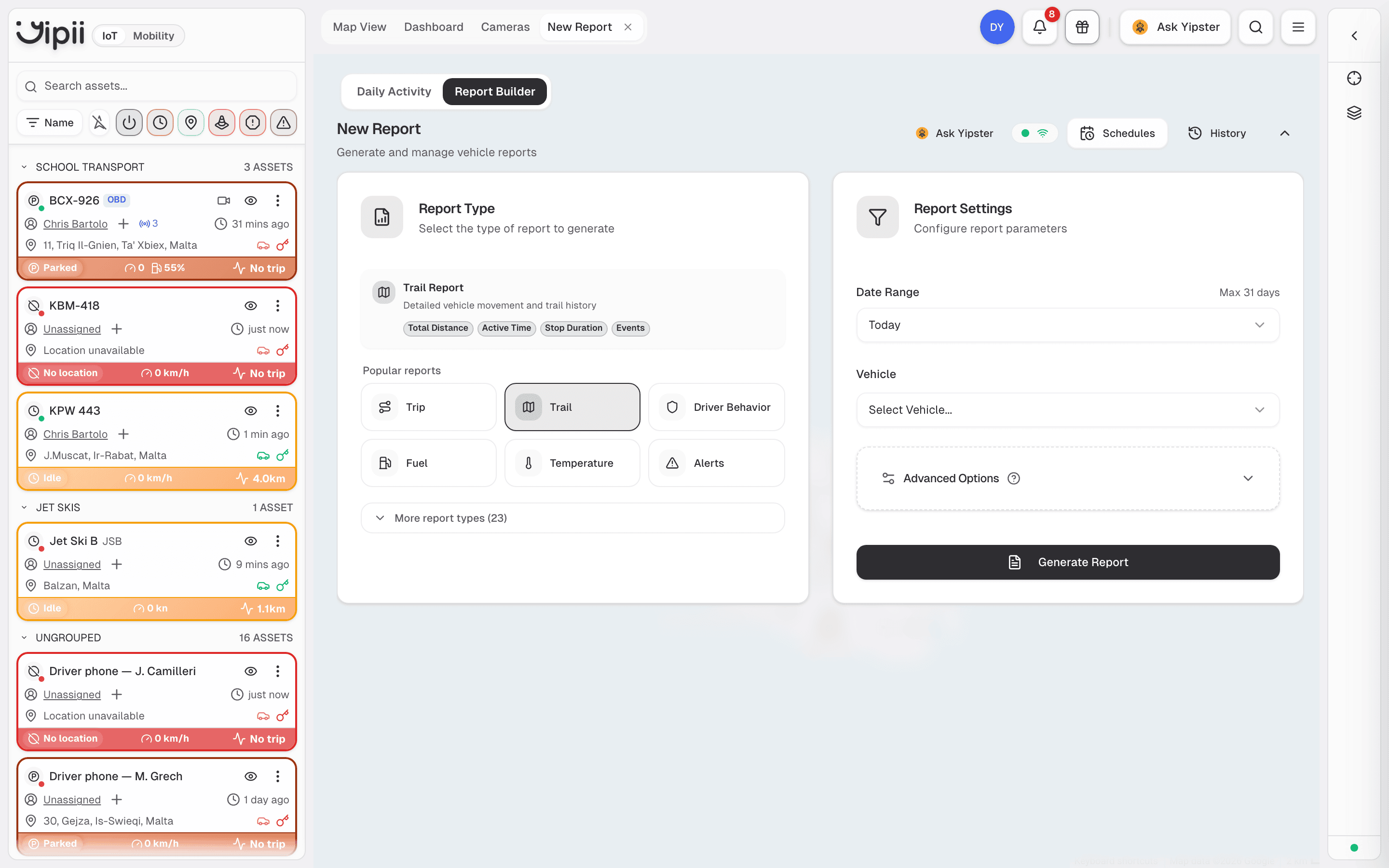
Three things to choose, in this order:
- Report type — six popular ones are surfaced directly (Trip, Trail, Driver Behavior, Fuel, Temperature, Alerts). More report types opens the remaining 23.
- Date range — capped at 31 days per report. For a quarter, run three.
- Vehicle — one asset, or leave it to cover what your role can see.
Advanced options adds per-report settings such as columns and thresholds. Then Generate report.
What each popular report answers
| Report | Answers |
|---|---|
| Trip | Where did it go, when, and how far — start and end per journey |
| Trail | The full movement history, position by position, with stop durations and events |
| Driver Behavior | Harsh braking, acceleration, cornering and speeding, by driver |
| Fuel | Consumption, refuels, and drops that do not match a refuel |
| Temperature | The cold-chain record — sensor readings over time, per vehicle |
| Alerts | What fired, when, and on which asset |
The other 23 cover mileage by day, week and month, period-over-period comparison, activity summaries, stops and idling, OBD data, beacons and point visits.
Generation is asynchronous
You do not wait on the screen. A report is queued, built in the background, and you are notified when it is ready. Large reports take longer; small ones come back quickly.
- Schedules — run a report automatically on a recurring basis and have it delivered by email or webhook. This is how most recurring reporting should work: nobody remembers to run the Monday report every Monday.
- History — every report you have generated, kept and searchable. Before building the same report again, look here.
Output formats are PDF, Excel, JSON and HTML.
Two temperature sources
Worth knowing before you pick a report, because choosing wrong gives you a chart of the wrong thing:
- Temperature report — environmental sensors. The reefer body, a Bluetooth or wired probe. This is the cold-chain record.
- OBD data report — the engine's own sensors: coolant, oil, intake air.
A refrigerated van has both. They are not interchangeable.
If it doesn't work
| Symptom | Cause | Fix |
|---|---|---|
| The date range will not accept my dates | 31 days is the maximum per report | Split it, or use a monthly mileage report for longer periods |
| The report is empty | The asset reported nothing in that window, or was offline | Check the asset on the map or its tracker |
| I can't find the builder on my phone | It is desktop-only by design | Use Daily Activity on mobile, or open the builder on a desktop |
| A temperature report shows engine values | You ran OBD data rather than the Temperature report | Use Temperature for sensors, OBD data for the engine |
| A fuel report shows drops I can't explain | Fuel level detection needs a calibrated tank capacity to be reliable | Confirm the vehicle's tank capacity is set before treating drops as theft |
| The report never arrived | Generation is queued — it notifies on completion | Check History; if it is not there, generate it again |
Related
- Alerts — for events you want to know about immediately, rather than in a report.
- Driver scoring — the scores behind the driver behaviour report.
- Geofences — site arrival and departure, which feeds point-visit reporting.
- Cold chain — how the temperature record is used for compliance.
Was this page helpful?