

Run a report
Choose the report, the dates and the vehicle in the Report Builder, and run it: yesterday's trips for one van, step by step.
A report from the trackers needs three things: which report, which dates, and which vehicle. This page runs a Trip report for yesterday for one vehicle, Hotel Shuttle 1.
Before you start — you need to be an account admin, a fleet manager, office staff, or have the reports only role. The vehicle needs a tracker that reported during those dates.
Steps
Go to Reports and click Report Builder, or click New report at the top right. In the menu on the left this is Builder.
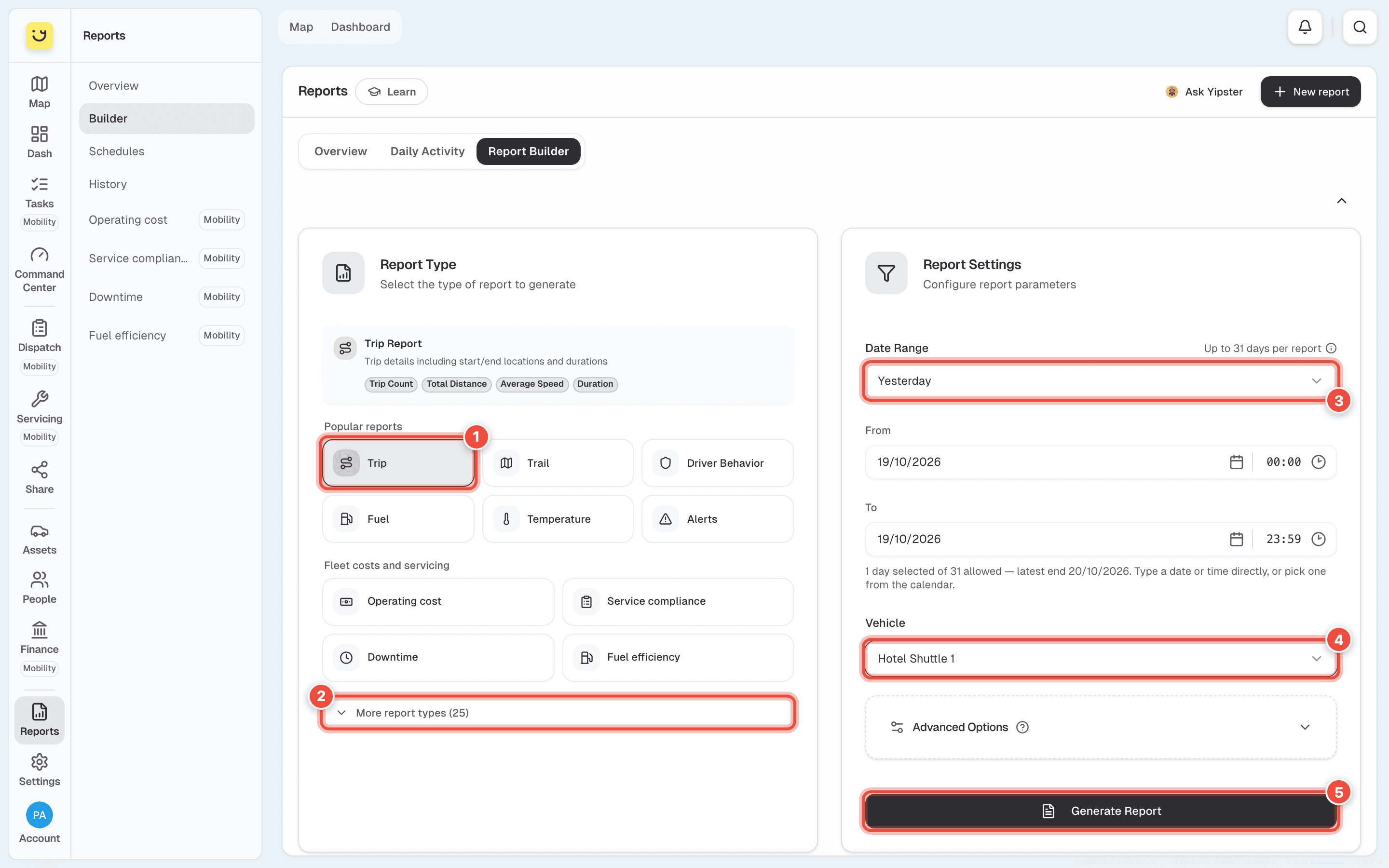
Under Popular reports, click Trip (1). The box above the buttons says what the report shows.
For anything else, click More report types (2). See Which report to choose.
Under Date Range (3), choose Yesterday. The other choices are Today, This Week, Last Week, This Month and Last Month. For other dates, type them into From and To, or pick them from the calendar.
Most reports cover up to 31 days at a time. The line under To says how many days you have chosen — 1 day selected for Yesterday — and the latest end date you can use.
Under Vehicle (4), click Select Vehicle..., type part of the name or plate — Hotel — and
choose the vehicle.
The mileage reports take more than one vehicle: tick the ones you want, or leave them all unticked to cover the whole fleet.
Optional: open Advanced Options to filter the rows or change how they are grouped. Leave it closed the first time.
Click Generate Report (5).
What happens next
The page shows Generating Report while Yipii builds it. A day or a week takes seconds; a month for a busy vehicle takes longer. You can leave the page — the report keeps being built and waits for you in History.
When it is ready, the report opens on the page with its totals along the top and a row for each trip. See Read and download a report.
Which report to choose
Popular reports has the six that are run most. More report types opens the rest, in groups: Trips & Movement, Driver, Vehicle Data, Mileage, Alerts and Beacons.
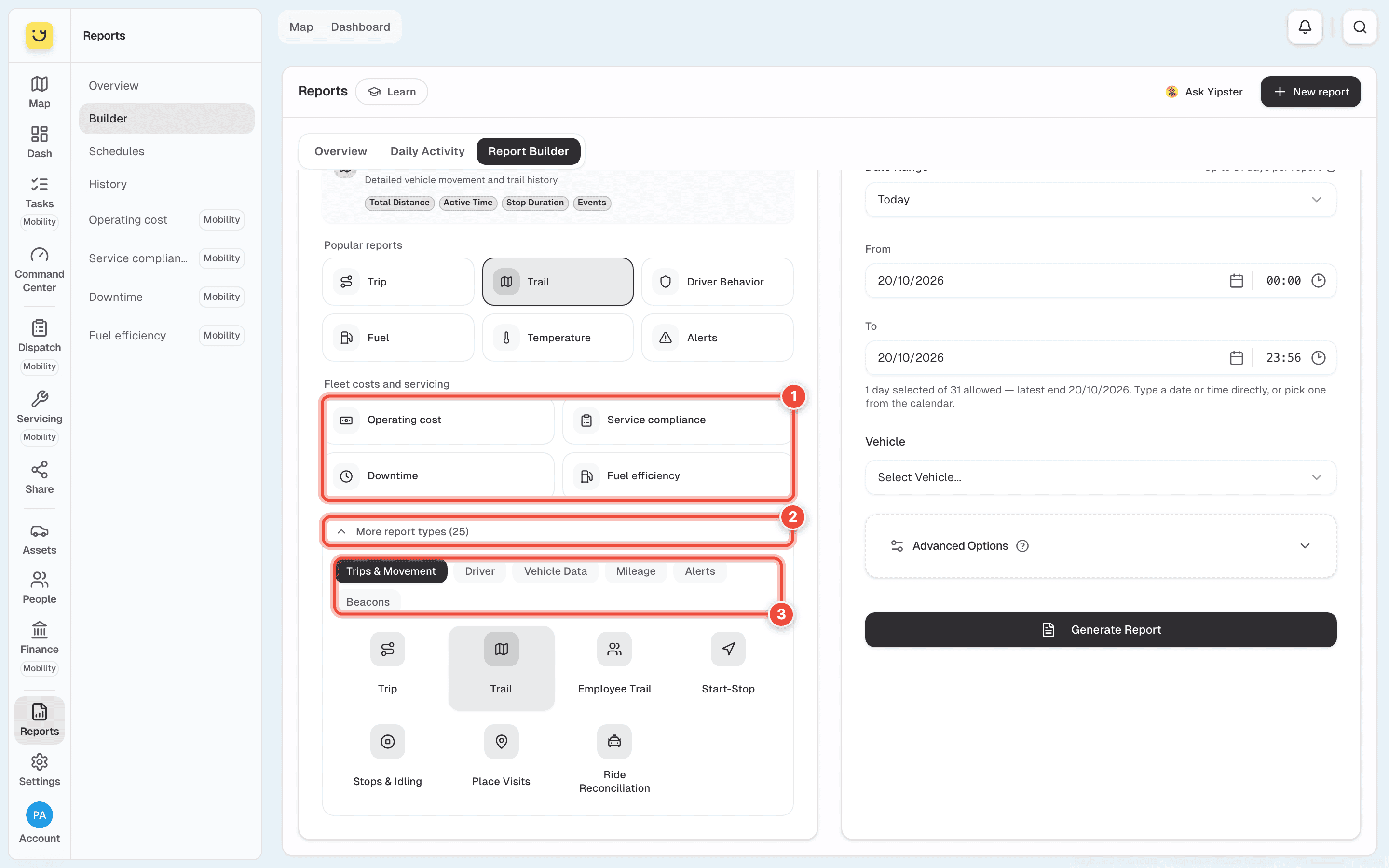
The Fleet costs and servicing reports (1) are the four Yipii Mobility reports. They open on their own pages — see Fleet cost and servicing reports. Click More report types (2), then a group (3) to see its reports.
| To find out | Run | Longest period |
|---|---|---|
| Where a vehicle went, when, and how far, one row per journey | Trip | 31 days |
| Every position the vehicle sent, with stops and events | Trail | 31 days |
| Where it stopped and how long it idled, on a map | Stops & Idling | 31 days |
| When it visited a shop, a fuel station or one of your geofences | Place Visits | 31 days |
| Harsh braking, acceleration, cornering and speeding, by driver | Driver Behavior | 31 days |
| Fuel used, refuels, and drops that do not match a refuel | Fuel | 31 days |
| Readings from a temperature probe in the load space | Temperature | 31 days |
| What the engine reported: coolant, oil, fault codes | OBD Data | 14 days |
| Kilometres per vehicle per day, week or month | Daily, Weekly or Monthly Mileage | 31 days, about 3 months, a year |
| Kilometres this month against last month, or this year against last | Mileage Comparison | a year |
| Which alerts fired, on which vehicle | Alerts | 31 days |
Temperature and OBD Data both have temperatures in them, and they are not the same. Temperature is the probe in the load space — the cold-chain record. OBD Data is the engine's own sensors.
If it doesn't work
| Symptom | Cause | Fix |
|---|---|---|
| Date Range Too Long appears | The range is longer than that report allows | Shorten it, or run it twice. For a long period, use a mileage report |
| Please select a specific vehicle appears | No vehicle is chosen. Only the mileage reports can cover the whole fleet | Choose one vehicle under Vehicle |
| The report says No Data Found | The vehicle sent nothing in those dates: it was parked, switched off, or its tracker was not reporting | Check the vehicle on the map. Try a longer range |
| The vehicle you want is not in the list | It has no tracker, or your role cannot see it | Check it under Assets |
| You left the page and the report is gone | It was still being built | Open History. Finished reports are listed there |
| The Fleet costs and servicing reports show a trial page | Your account does not have Yipii Mobility | See Fleet cost and servicing reports |
| Reports is not in your menu | Your role has no access to reports | Ask an account admin to change your role |
Related
- Check one vehicle's day — the quick answer, with nothing to build.
- Email a report on a schedule — the same report every week, by email.
- Read and download a report — what to do with it once it is ready.
Was this page helpful?