

Start from a template
Every kind of alert in one list, with the ones you already have marked: switch on a recommended alert, or open the one you set up before.
Templates lists every kind of alert Yipii can watch for, and says beside each one whether you already have it. It is the quickest way to see what you are not covered for yet.
Before you start — you need to be an account admin or a fleet manager.
Steps
Go to Alerts and click Templates, under the title.
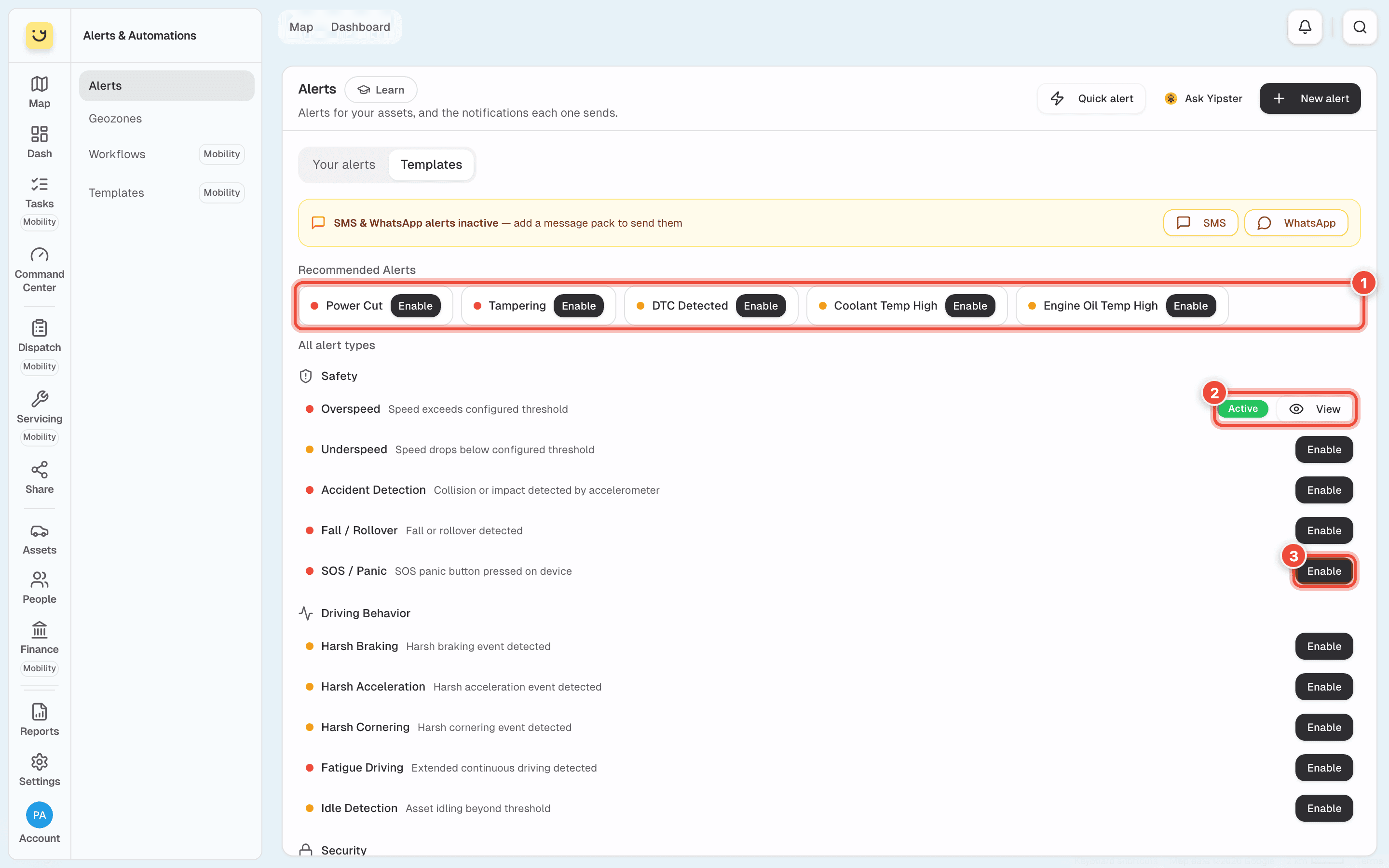
Read the state beside each kind:
- Active and View (2) — you have it and it is on, as Overspeed is here. The number beside Active, when there is one, is how many vehicles it covers.
- Off and View — you have this alert, switched off. View opens it.
- Enable (3) — you don't have it yet. On an account with no alerts, every kind says Enable.
Recommended Alerts (1) across the top are the ones most fleets want: Power Cut, Tampering, faults (DTC Detected) and engine temperatures. Under All alert types is everything else, grouped as Safety, Driving Behavior, Security, Geozones & Movement, Vehicle, Fuel and Device Health. A coloured dot shows how urgent the kind is: red, then orange.
Click Enable (3) beside the one you want — SOS / Panic. This opens New alert with the kind already chosen, on every day of the week, all day. Nothing is saved yet.
Choose the vehicles on Assets and who gets told on Notify, then click Create Alert. See Set up an alert and Choose who gets told, and how.
What happens next
The kind changes to Active in Templates, and the alert appears in Your alerts.
If you click View on an alert that is Off, you edit the one you already have. Switch it on there rather than making a second one: two copies of the same alert send every message twice.
If it doesn't work
| Symptom | Cause | Fix |
|---|---|---|
| Enable is greyed | That kind is not switched on for your account yet — hold the pointer over it to see | Get in touch and we will switch it on |
| The alert never fires although it is Active | The tracker on those vehicles can't detect it — SOS / Panic needs a panic button, DTC Detected needs a tracker that reads engine faults | Ask us which trackers report it |
| Every message arrives twice | You have the same alert twice, often one made with Enable while the other was Off | In Your alerts, search for it and delete the spare one from its ⋮ menu |
Related
Was this page helpful?