

Fleet cost and servicing reports
Operating cost, Service compliance, Downtime and Fuel efficiency: what each one counts, how to narrow it, and how to export it as CSV.
Four reports answer questions about money and the workshop rather than about driving. They are worked out from what your team records — work orders, fuel entries, expenses, service schedules and odometer readings — so they open straight away, with nothing to build.
Before you start — these reports are part of Yipii Mobility. You need to be an account admin, a fleet manager, or have the reports only role. On an account without Yipii Mobility they show what they add and how to start a trial.
Open them from the Reports menu: Operating cost, Service compliance, Downtime and Fuel efficiency. They are also under Fleet costs and servicing in the Report Builder, and each figure on the Overview opens one.
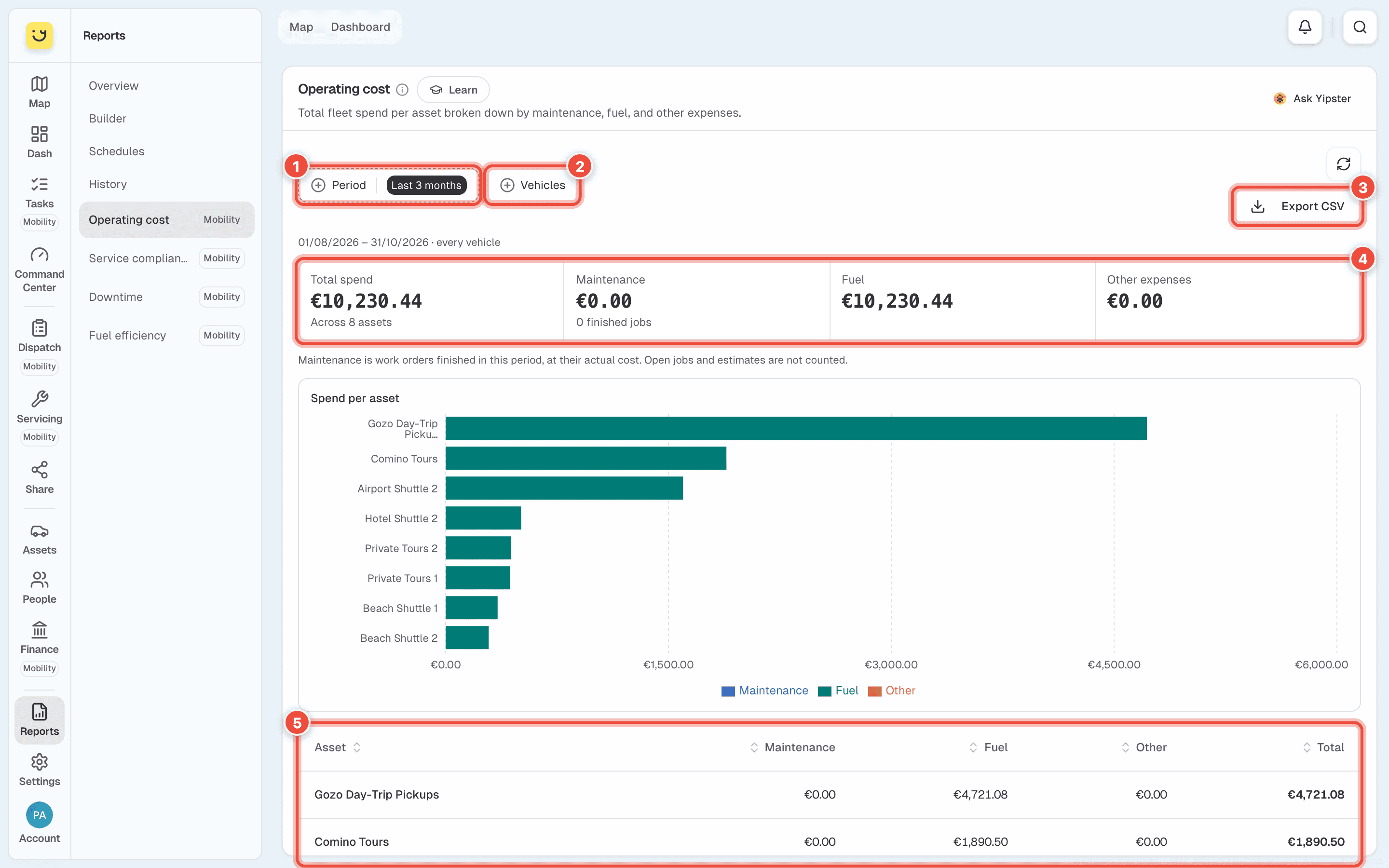
How to use them
All four work the same way:
- Period — the dates the report covers. It starts on Last 3 months. The line under the buttons shows the exact dates. On a phone, Period is a button that names the choice — Last 3 months — and opens the others.
- Vehicles — narrow the report to some vehicles. With none chosen it covers every vehicle.
- Export CSV — downloads what is on screen as a spreadsheet file.
- The totals — the period in a few figures. A dash (—) means there is not enough data yet, and the line under it says what is missing.
- The table — one row per vehicle. Click a column heading to sort by it.
What each one counts
| Report | Answers | Counts | Needs |
|---|---|---|---|
| Operating cost | What is the fleet costing me? | Maintenance, fuel and other expenses per vehicle. Maintenance is work orders finished in the period at their actual cost — open jobs and estimates are not counted. | Finished work orders, fuel entries, expenses |
| Service compliance | Am I keeping up with servicing? | Every service schedule as of today: Overdue (past the date or the kilometres), Upcoming (due within 30 days or 1,000 km), Up to date, and Completed in the period. The compliance rate is the share not overdue. | Service schedules |
| Downtime | What is off the road, and for how long? | Hours in the workshop per vehicle, from when work started to when it finished, inside the period. Also the average repair time and the time between repairs. | Work orders started and finished in the app |
| Fuel efficiency | Which vehicles are using the most fuel? | Kilometres per litre per vehicle, with litres and fuel cost. | At least two fill-ups with odometer readings per vehicle |
If it doesn't work
| Symptom | Cause | Fix |
|---|---|---|
| A trial page opens instead of the report | Your account does not have Yipii Mobility | Start a trial from that page, or ask an account admin |
| The reports are not in your menu | Your role is office staff, mechanic, inspector or driver | Ask an account admin for the fleet manager or reports only role |
| Maintenance shows €0.00 | No work order was finished in the period | Finish the work order, or choose a longer period |
| Downtime says No start time | The work order was finished without being started | Start work orders when the vehicle goes into the workshop |
| Fuel efficiency says Not enough fill-ups | The vehicle has fewer than two fill-ups with an odometer reading | Log the odometer with every fill-up. Litres and cost are still shown |
| A service you just did still shows Overdue | The service has not been recorded against the schedule | Record it in Servicing, then refresh the report |
Related
- See your fleet at a glance — all four in one screen.
- Run a report — reports from the trackers.
Was this page helpful?