

Choose your notifications
Turn on push for this device, choose which account emails and push messages you get, the daily fleet summary, sign-in warnings, and Yipster on WhatsApp.
Settings › Notifications decides which messages about your account reach you, and how: by email, by push on this device, or both. It is yours alone. Alerts about the fleet — speeding, a geozone, a power cut — are not set here: each alert has its own recipients, set in Alerts & Automations.
Steps
Go to Settings › Notifications. At the top, Push notifications says whether this browser may show them. Switch it on; the browser asks for permission — allow it. It is the browser's own question, so it looks different in Chrome, Safari and Firefox.
Under System Notifications, each message has two switches: Email and Push (1).
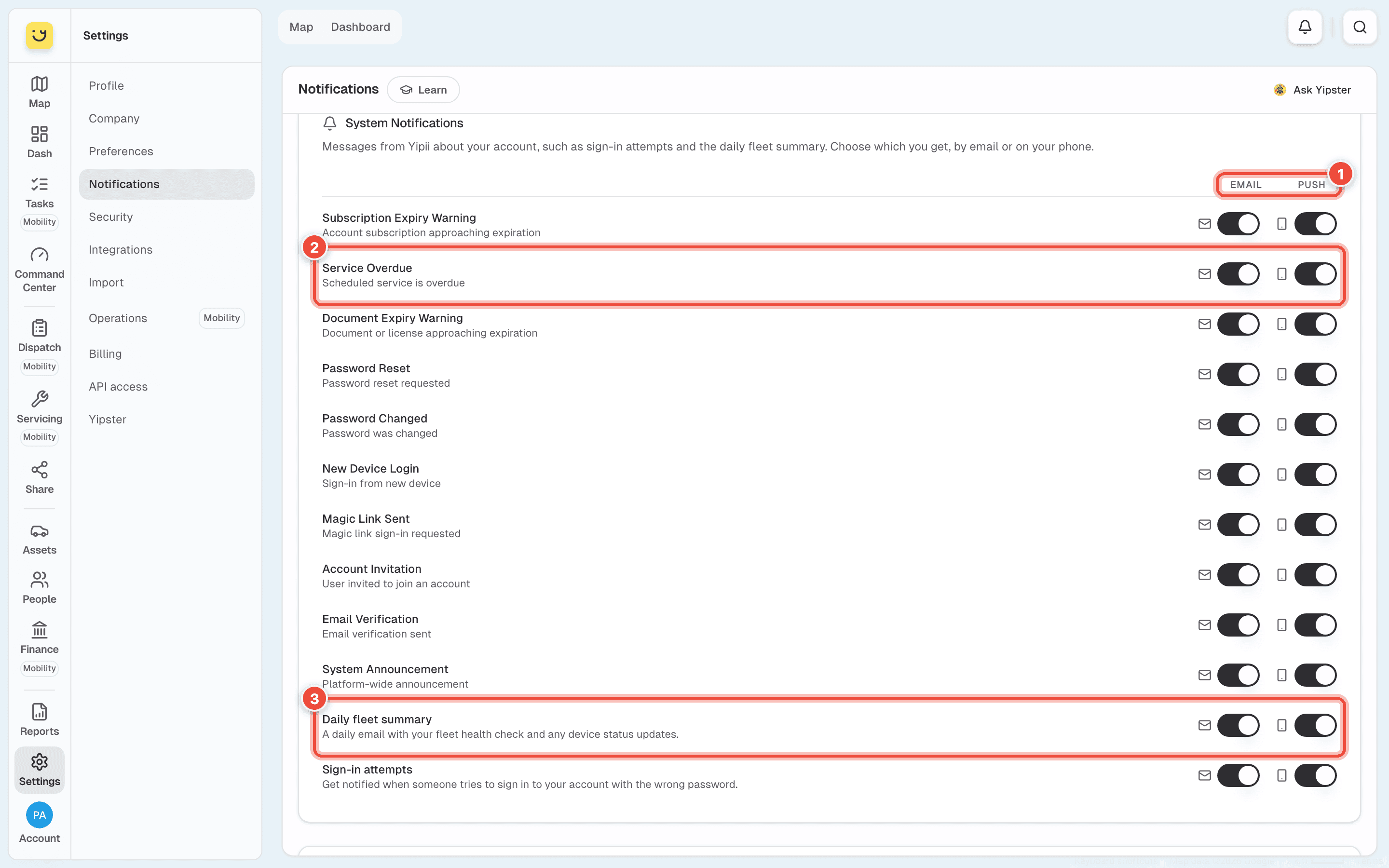
The messages are about the account and your sign-in: Subscription Expiry Warning, Service Overdue (2), Document Expiry Warning, Password Reset, Password Changed, New Device Login, Magic Link Sent, Account Invitation, Email Verification and System Announcement.
Switch off what you don't want. Keep Push on for Service Overdue (2) and switch its Email off, for instance, and the warning reaches your phone without filling your inbox.
Choose whether to get the Daily fleet summary (3) — one email a day with the fleet's health check and any tracker that changed state — and Sign-in attempts, an email when someone tries your account with the wrong password.
Further down, Email Notifications has Maintenance Alerts (our planned maintenance, when
it starts and ends) and Release Notes & Updates. For maintenance alerts on WhatsApp, type
your number under WhatsApp Phone Number with its country code — +35699123456 — and click
Save.
Each switch takes effect when you move it.
Ask Yipster on WhatsApp
The WhatsApp part of the page links your phone to Yipster, so you can ask where the vans are from WhatsApp. Click Link my WhatsApp: WhatsApp opens with a one-time code ready to send. The phone that sends it is the one linked. Yipster answers about this account only, and only to linked numbers. See Yipster settings for what each question uses.
Guided Tour at the foot of the page replays the tour of Yipii — Take a Tour.
The bell
The bell at the top of the screen keeps every notification, whether or not you saw the push. The number on it is how many you haven't read. It has four tabs: All, Alerts (from your fleet alerts), Events (documents, services, subscription) and Info (sign-ins, password changes, announcements). Click a notification to open what it is about; Mark all read clears the number.
Push on a phone
Push is allowed per browser, per device: allowing it on your laptop does nothing for your phone. On an iPhone, Yipii must be added to the home screen before it can receive push at all — see Install Yipii on your phone, then open the installed app and allow notifications there.
If it doesn't work
| Symptom | Cause | Fix |
|---|---|---|
| Notifications blocked at the top of the page | This browser refused permission, and Yipii can't ask again | Allow notifications for Yipii in the browser's site settings, then reload |
| Push works on the laptop, not the phone | Permission is per device | Allow it again on the phone |
| Nothing arrives on an iPhone | Yipii isn't installed on the home screen | Install it and allow notifications in the installed app |
| Every switch is on but no speeding messages arrive | Fleet alerts are not set on this page | Create the alert and add yourself as a recipient — see Choose who gets told |
| Nothing arrives on a Mac | Focus or Do Not Disturb is on, or the browser's notifications are off in System Settings | Check macOS notification settings for the browser |
| Push stopped after a while | The browser forgot the permission — common after clearing site data | Reload Yipii and allow notifications again |
Related
- Choose who gets told — recipients and channels for fleet alerts.
- Install Yipii on your phone — needed for push on an iPhone.
- Change your profile, password and PIN — the devices signed in to your account.
Was this page helpful?