

User guide
Where everything is in Yipii IoT and where to go first — the map, assets, trackers, alerts, geofences, reports, sharing and settings, one page each.
Yipii IoT opens on one screen and mostly stays there. Rather than a sidebar of pages, it uses a single workspace with tabs — so the first thing worth learning is where the three parts of that screen are.
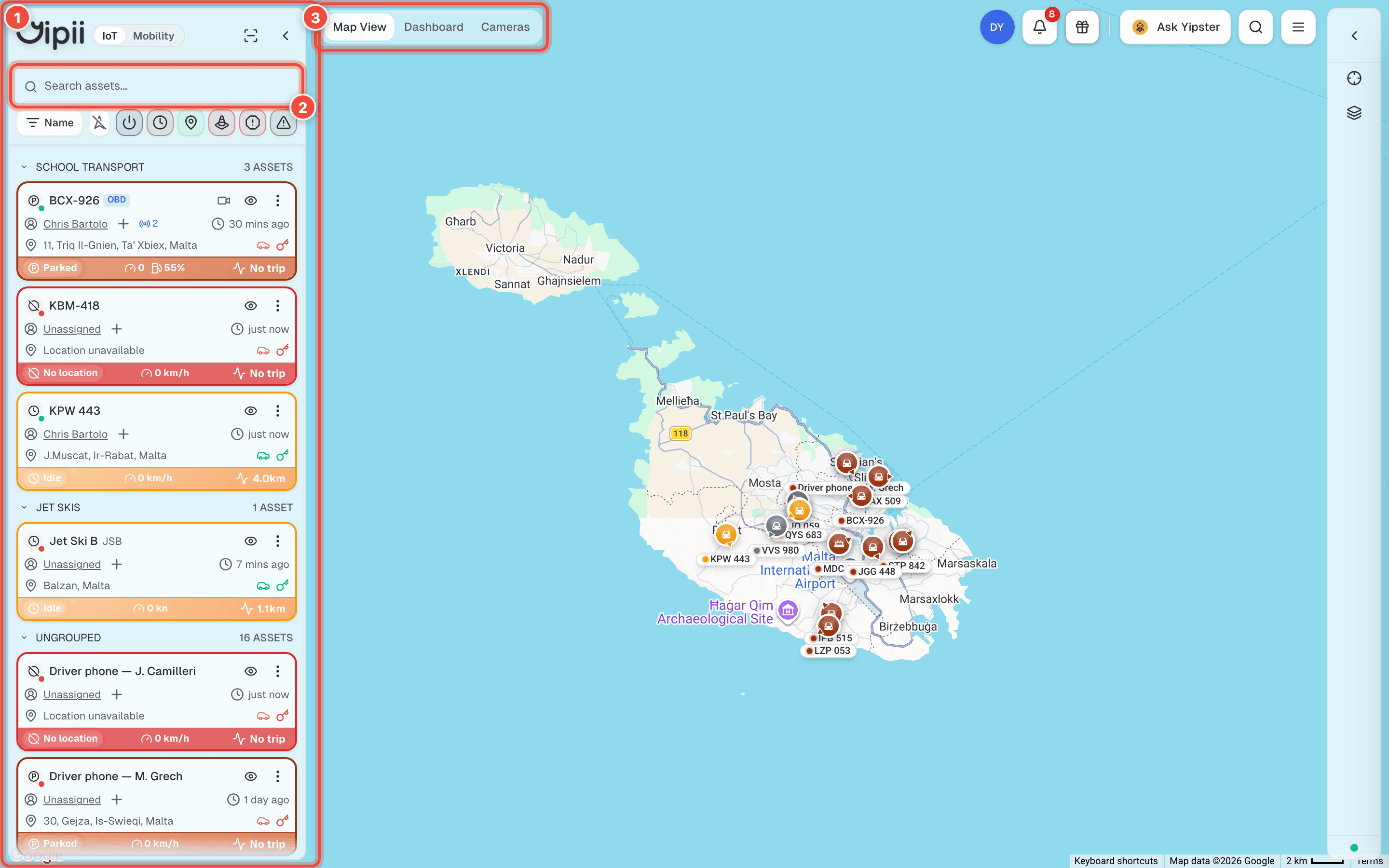
- Asset panel — every vehicle and piece of equipment you can see, grouped and colour-coded by status. Click one to focus the map on it; the three-dot menu on a card holds per-asset actions like sharing a tracking link.
- Search and filters — find an asset by name, or filter the list down by status: moving, idle, parked, offline. On a big fleet this is faster than hunting on the map.
- View switcher — Map View, Dashboard and Cameras. Everything else (assets, alerts, reports, users, settings) opens as an additional tab alongside these, from the menu in the top-right.
On a phone the layout collapses: the asset panel becomes a narrow rail, and the view switcher becomes a single button showing the current view.
Start here
New account, nothing set up yet:
- Quick start — from signing in to a vehicle on the map.
- Register a tracker — by QR scan or IMEI.
- Draw a geofence — the depots and sites everything else keys off.
- Set up your first alert — and send it to someone who will act on it.
The rest of the guide
Watching the fleet
- Map — live positions, layers and controls.
- Statuses — what moving, idle, parked and offline actually mean.
- Dashboard — fleet-level numbers and trends.
- Assets — the vehicle record, its details and photos.
Being told about things
- Alerts — conditions, channels, quiet hours.
- Geofences — the shapes alerts and reports key off.
- Push notifications — free, instant, works when the app is closed.
Getting numbers out
- Reports — Daily Activity and the Report Builder.
- Driver scoring — behaviour, grades and coaching.
Hardware
- Trackers — supported models, setup, remote commands.
- Beacons — tracking things that have no tracker of their own.
Sharing with customers
- Tracking links — live tracking without a login.
- Users — who on your team sees what.
Account
Looking for maintenance?
Servicing, work orders, parts and inspections are Yipii Mobility, a separate product against the same vehicles. Tracking tells you where a van is; Mobility tells you what it needs.
Was this page helpful?