

Upload a driver's documents and licence
Upload a scan of a driver's licence, ID or certificate to their page or to People → Documents, add the licence itself, and approve what drivers file from the app.
Keep each driver's papers with them: the scan of their licence, their ID card, a medical certificate. Yipii shows when each one runs out, and Compliance checks them against what your account requires.
Before you start — you need Yipii Mobility on your account, and to be an admin, fleet manager or office staff. Have the file ready: a PDF, JPG or PNG up to 10 MB.
Steps
Go to People → Team & seats and click the driver — Kevin Farrugia.
Scroll to Documents and click Upload.
Click Choose File (1) and pick the scan. Type a Name — Driving licence — and choose the
Type (2). Belongs to and Person are filled in with the driver already.
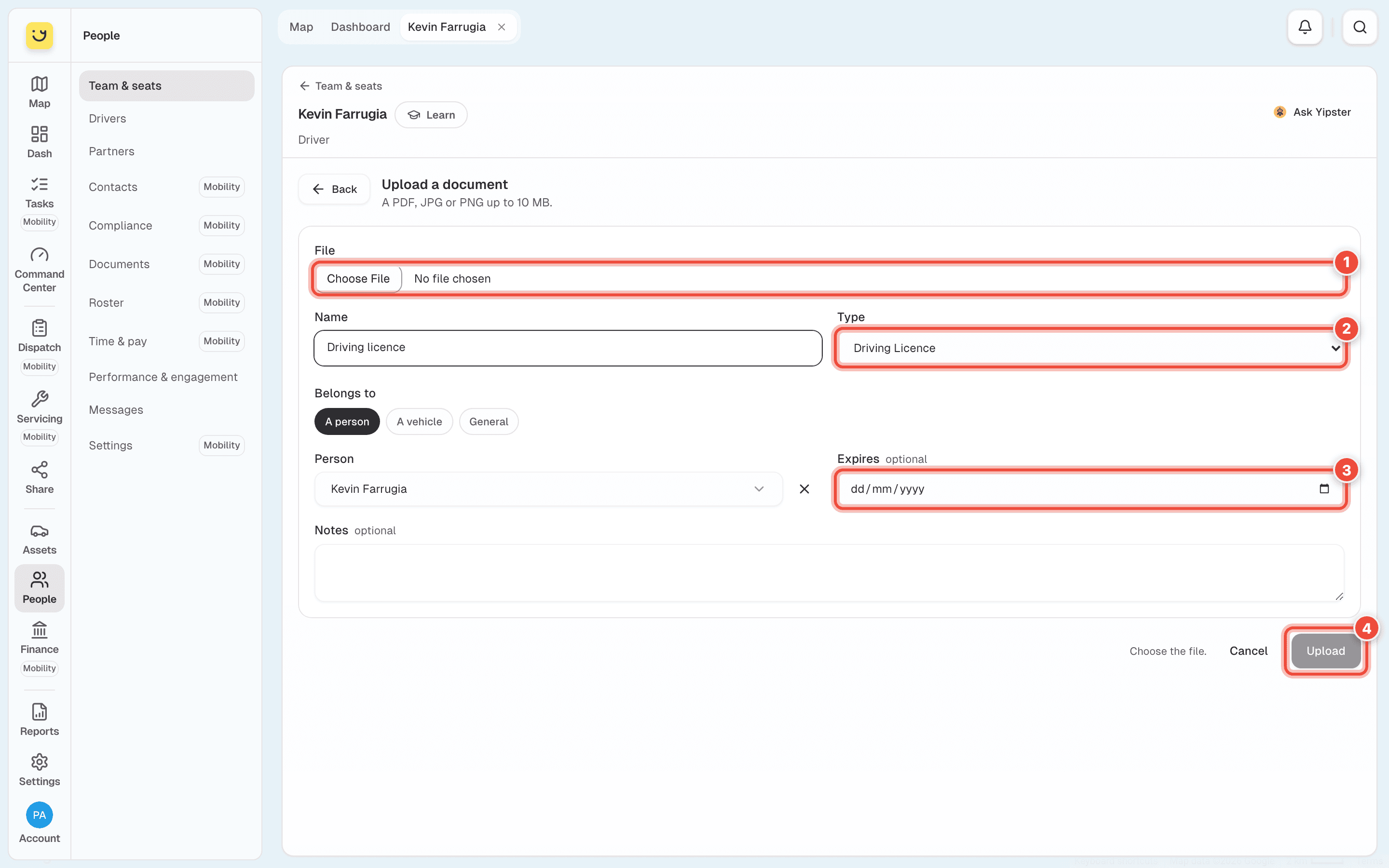
Set Expires (3) if the document runs out. In its last 30 days it counts under Expiring in 30 days. Leave it empty for a document that never expires.
Click Upload (4). On a phone it is below Notes.
To upload a vehicle's papers, or a document that belongs to nobody, go to People → Documents and click Upload a document. Under Belongs to, choose A person, A vehicle or General.
Add the licence itself
The scan is the picture; the licence is the record Yipii checks — its number, class and expiry. On the driver's page, under Licences, click Add. Fill in Licence number, Type, Class, Issuing authority, Issued and Expires, then click Add the licence. Every licence on the account is under People → Compliance → Licences.
Approve what a driver uploads
Drivers can file documents from the Yipii Driver app. Those wait for you: People → Documents counts them in the Waiting for review tile. Click a document to see it, then Approve, or Reject… and say why — the driver is emailed the reason and can upload it again. To do several at once, tick their rows and use Approve or Reject… in the bar that appears.
Only an admin or fleet manager approves and rejects.
What happens next
The document is listed on the driver's page under Documents, and on People → Documents with its expiry. Open the file on a document gives you a link that works for five minutes, and the document records who opened it.
When a document has expired it is marked Expired in red, and the Expired tile counts it.
If it doesn't work
| Symptom | Cause | Fix |
|---|---|---|
| Upload stays grey and says Choose the file. | No file is chosen yet | Click Choose File |
| The file is refused | It is larger than 10 MB, or not a PDF, JPG or PNG | Save it smaller, or as a PDF, and try again |
| Documents is not on the driver's page | Your account does not have Yipii Mobility, or your role cannot see documents | Ask an admin |
| The driver's page shows only some documents | It shows the newest ones | Every one is under People → Documents — choose the driver in Person |
| There is no Approve button | Only admins and fleet managers review documents | Ask one of them |
Related
Was this page helpful?