

Assign a driver to a vehicle
Set who drives a vehicle from its row on All assets or from the person's page, and why a driver detected mid-trip cannot be changed until the trip ends.
Set who is driving a vehicle now. You can start from the vehicle, in the All assets list, or from the person.
Before you start — you need to be an account admin or a fleet manager. The person has to be set up as a driver on the account.
Steps
From the vehicle
Go to Assets → All assets and find the vehicle — search Hotel Shuttle 1.
In the Driver column, click the driver's name (1). It reads Unassigned when nobody drives the vehicle.
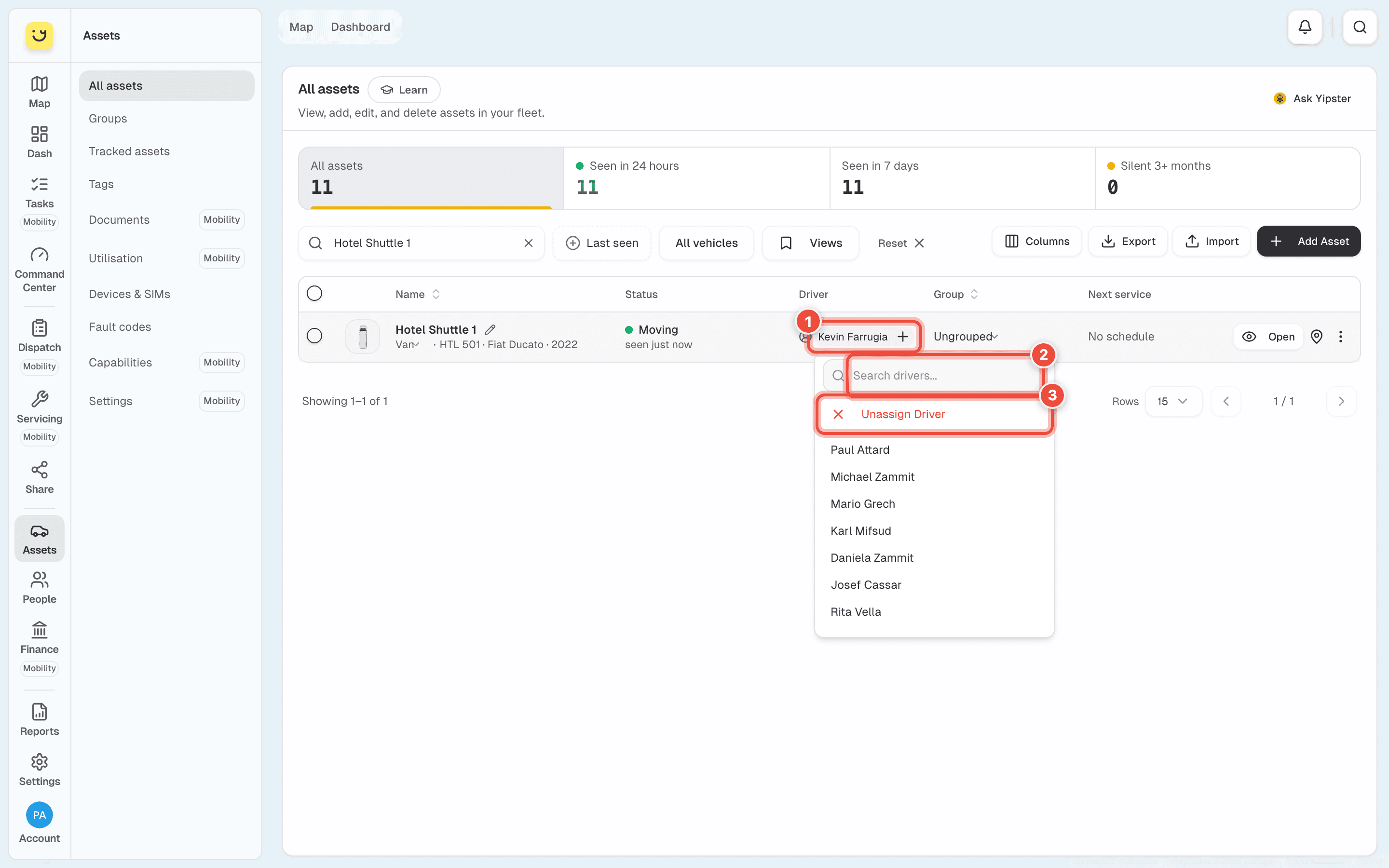
Type a name in Search drivers (2) and click the person. To leave the vehicle with no driver, click Unassign Driver (3).
The Driver column is on a computer only. On a phone, start from the person, or open the vehicle and go to Manage → Who can drive it.
From the person
Go to People → Drivers and click the person — Kevin Farrugia.
Under Vehicle, click Assign a vehicle and choose the vehicle.
In the People → Drivers list, the vehicle cell of each row does the same without opening the person.
What happens next
The driver's name shows in the list, in the vehicle's Command Center and on the map. From the person's page Yipii confirms it in a sentence such as Kevin Farrugia now drives Hotel Shuttle 1.
A manual assignment holds until a tag decides otherwise. If the vehicle's tracker reads a driver's iButton or beacon on a later trip, that driver replaces the one you set.
When a detected driver is driving
While a tracker is reading a driver's tag and the trip is under way, that driver's name shows in green and cannot be changed. Hover it to see why: the reassignment is locked until the trip ends. Try again once the trip has finished.
If it doesn't work
| Symptom | Cause | Fix |
|---|---|---|
| The driver's name is green and does not open a menu | A driver detected by their iButton or beacon is mid-trip | Wait for the trip to end, then assign |
| Driver assignment blocked appeared | Same: another driver is actively driving this vehicle | Wait for the trip to end, then assign |
| The person is not in the list | They are not set up as a driver | Make them a driver from People → Team & seats, or change their role to Driver |
| Two people with the same name are listed | Two separate people share a name | Each shows their email under the name. Search by email to pick the right one |
| A window offering automatic driver identification opened | Your account does not have the Driver Add-On, and Yipii offers it after a manual assignment | Close it. The driver is already assigned |
Related
- Rename a vehicle, or change its group, type or fleet status — the other values you change in the row.
- Beacons and tags — give a driver a tag so the tracker assigns them on its own.
- Driver scoring — how trips are scored, driver by driver.
Was this page helpful?