

Reports
Where reports live: the Reports menu, the Overview, Daily Activity and the Report Builder, and what each page is for.
Reports answer questions about the past: where a vehicle went yesterday, how far the fleet drove last month, what the fleet cost this quarter. Anything you need to know the moment it happens belongs in an alert instead.
Open Reports from the menu on the left. On a phone, tap the menu button at the bottom of the screen, then Reports. An account with Yipii Mobility opens on Overview. Any other account opens on the Report Builder, or on Daily Activity on a phone.
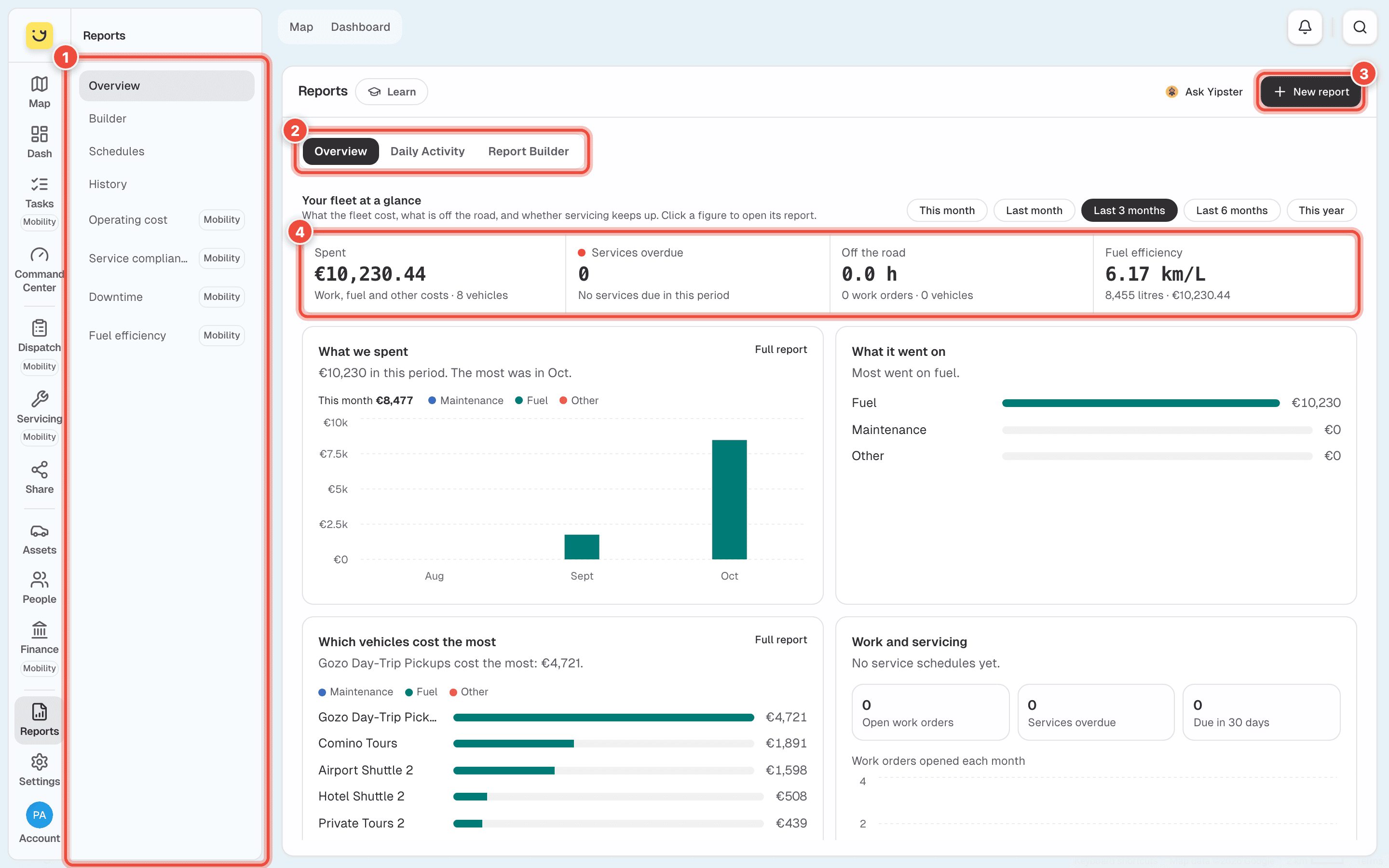
- The Reports menu — Overview, Builder, Schedules, History and the four fleet cost reports, listed under What is in the menu. On a phone it is the row of buttons along the top; swipe it sideways for the rest.
- Overview, Daily Activity and Report Builder — three views of the same page. Overview is the fleet's costs and servicing at a glance. Daily Activity is one vehicle's day. Report Builder runs any report for any dates.
- New report — opens an empty Report Builder. See Run a report.
- The four figures — what the fleet spent, services overdue, vehicles off the road and fuel efficiency, for the period you choose. Click one to open its report. See See your fleet at a glance.
Reports from the trackers — trips, trails, mileage, driver behaviour, fuel, temperature — are built in the background. You can leave the page while one is made; it waits for you in History.
What is in the menu
Account admins, fleet managers, office staff and people with the reports only role see Reports. Items marked Yipii Mobility open only on an account with Yipii Mobility. On any other account they show what they add and how to start a trial. Office staff do not see them.
| Item | What it is for |
|---|---|
| Overview | The fleet's costs and servicing for a period, in four figures and four charts. Yipii Mobility. |
| Builder | Choose a report, the dates and the vehicle, and run it. Daily Activity is here too. See Run a report. |
| Schedules | Reports that run by themselves and arrive by email. See Email a report on a schedule. |
| History | Every report run on the account, by anyone, from the last 7 to the last 90 days. See Find a report you ran before. |
| Operating cost, Service compliance, Downtime, Fuel efficiency | Costs and servicing, worked out from your work orders, fuel entries and service schedules. See Fleet cost and servicing reports. Yipii Mobility. |
Where to go next
- Run a report — choose the report, the dates and the vehicle.
- Check one vehicle's day — trips, stops and idling, with nothing to build.
- Read and download a report — search the rows, choose columns, get a PDF or Excel file.
- Email a report on a schedule — the Monday report, without anyone remembering to run it.
Was this page helpful?