

See your fleet at a glance
The Reports Overview: what the fleet cost, what is overdue for a service, what is off the road and how much fuel it uses, for the period you choose.
Overview answers four questions in one screen: what did the fleet cost, is servicing up to date, what is off the road, and which vehicles use the most fuel. Every figure comes from one of the four fleet cost and servicing reports, for the same period, so a figure here always matches its report.
Before you start — Overview is part of Yipii Mobility. You need to be an account admin, a fleet manager, or have the reports only role. An account without Yipii Mobility opens Reports on the Report Builder instead.
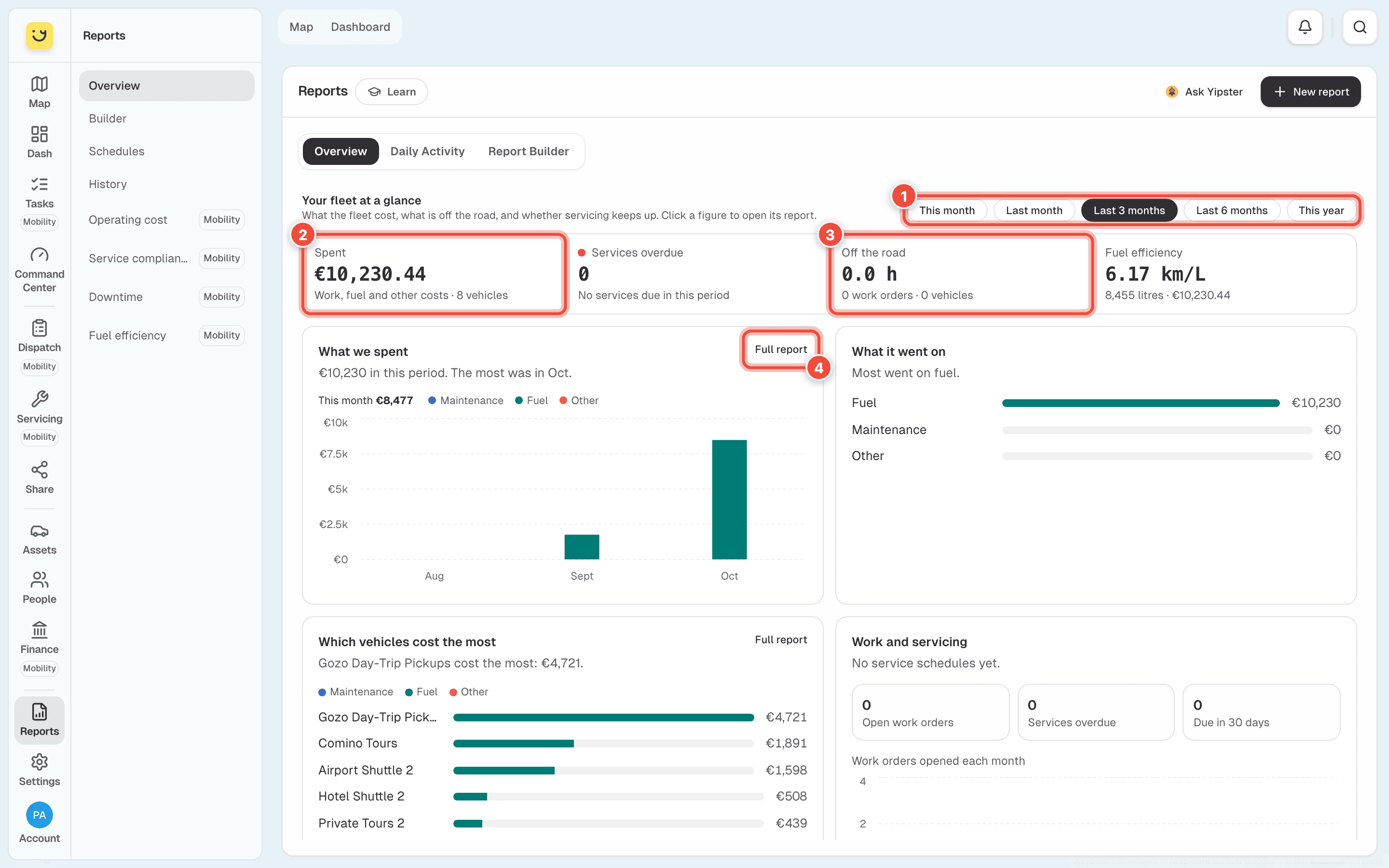
How to read it
- The period — This month, Last month, Last 3 months, Last 6 months or This year. It starts on Last 3 months. Every figure and chart below follows it.
- Spent — work, fuel and other costs for the period, and how many vehicles they were for. Click it to open Operating cost.
- Off the road — hours vehicles spent in the workshop. A dash (—) means Yipii cannot work it out yet: the line under it says why, such as No start time when a work order was never started in the app. The same goes for Fuel efficiency, which needs fuel entries and odometer readings.
- Full report — opens the report a chart comes from. On a phone, tap the figure instead.
Services overdue counts service schedules past their date or their kilometres, with how many are coming up and how many were done in the period.
Below the figures are four charts:
| Chart | What it shows |
|---|---|
| What we spent | Spending per month, split into maintenance, fuel and other. This month is the running total so far. |
| What it went on | The period's spending by kind, largest first. |
| Which vehicles cost the most | The vehicles with the highest spend, each split the same way. |
| Work and servicing | Open work orders, services overdue and services due in the next 30 days, and how many work orders were opened each month. |
What you should do
- A figure that looks too low usually means something was not recorded. Maintenance counts only work orders finished in the period, at their actual cost — an open job or an estimate is not spending yet.
- For trips, stops, mileage and fuel from the trackers, use Build a report at the bottom of the page, or Report Builder at the top.
If it doesn't work
| Symptom | Cause | Fix |
|---|---|---|
| There is no Overview | Your account does not have Yipii Mobility, or your role is office staff | Use the Report Builder. Ask an account admin about your role |
| A figure shows a dash (—) | There is not enough data to work it out | Read the line under the figure. It says what is missing |
| Spent is lower than you expected | A work order is still open, or a fuel entry was never logged | Finish the work order and log the fuel, then look again |
| Off the road says No start time | The work order was finished without ever being started | Start work orders when the vehicle goes into the workshop |
Related
- Fleet cost and servicing reports — the four reports behind these figures.
- Run a report — reports from the trackers.
Was this page helpful?